
Retail point of sale, inventory and accounting

Give the counter a clear way to sell.

Ring up sales, select the right customer price and keep the stock and financial records in Brisk. Review the work with someone who knows Brisk and can give practical guidance.

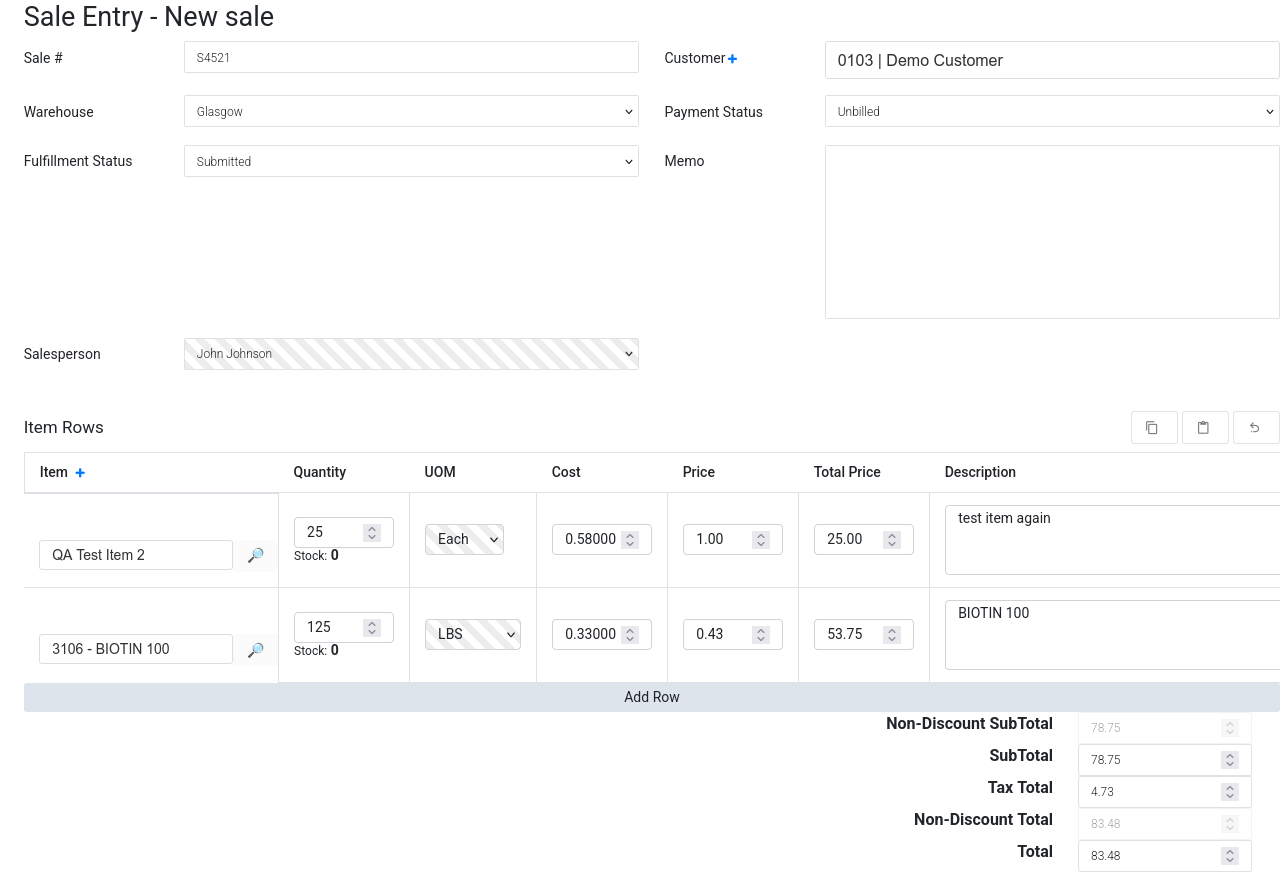
Brisk retail sale entry showing a demo customer and priced item lines
Customer selection and line pricing in an actual Brisk sale-entry screen. Demo data shown. Open the full-size screen.

Customer pricing

Put the price in the system.

A product can have different prices for retail, wholesale and other configured customer groups. Brisk uses the selected customer's setup to choose the applicable price.

Staff can learn how to identify the customer and verify the ticket instead of memorizing every pricing arrangement. Your item prices and customer classifications still need to be maintained.

Connected records

Follow the transaction beyond the receipt.

Counter sales are part of the same application as inventory, accounting and reporting. During the demonstration, follow one of your normal sales through the records it changes.

Then try a mistake and its correction. Check how an employee finds the transaction and what information is available to the person investigating it.

Physical counts and good operating procedures remain part of keeping stock records accurate. The evaluation should show how Brisk supports that work.

See the configured customer-pricing workflow.

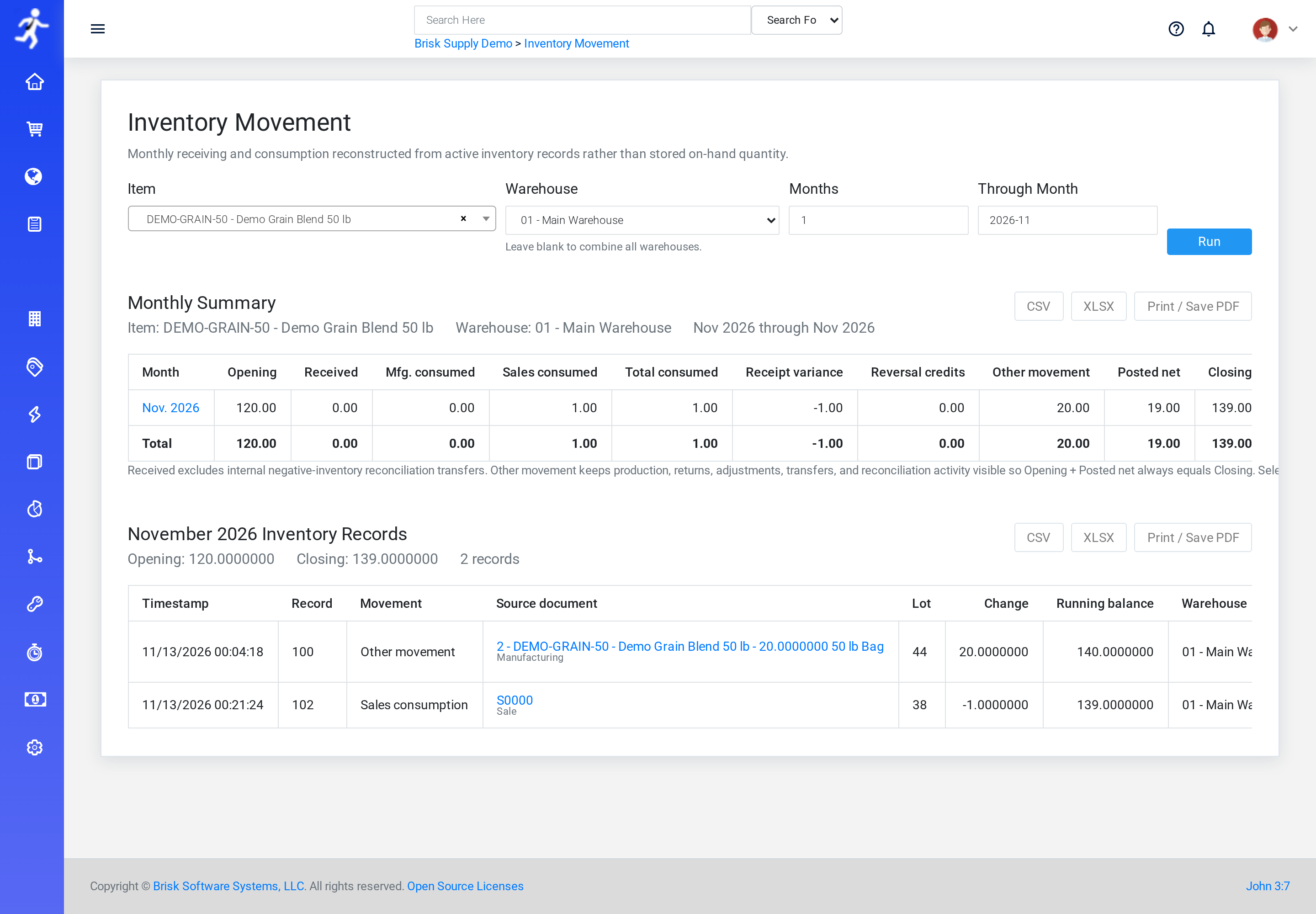
Demo inventory movement detail showing stock changes and their source records
Demo data. Review a demo item's stock changes and their source records. Open the full-size screen.

Representative tasks

Check the routines your team will use.

  • Find an item and complete an ordinary sale.
  • Select a customer with a different pricing arrangement.
  • Record stock arriving and check the resulting quantity.
  • Find the sales and financial reports your manager needs.

Ask someone who normally covers the counter to try those tasks. Their experience is a useful part of deciding whether the setup fits.

Customer experience

Simple sales and customer accounts at All In Bloom.

All In Bloom, a florist in Glasgow, Kentucky, wanted a straightforward way to handle sales and customer accounts. After using Microsoft RMS and QuickBooks POS, the shop needed a system that suited its simple counter routine. It does not use inventory tracking or barcode scanning.

The owner describes Brisk as less complicated, with fewer steps. Staff ring up sales using categories such as fresh flowers, plants, delivery and weddings. They can charge a sale to a customer account, look up the balance and take payments against it.

The owner recalls an easy transition from QuickBooks POS and says the change did not interrupt business or cause lost sales. She says new employees usually learn the register by shadowing experienced staff for a couple of days.

During busy flower-selling holidays, including Valentine's Day and Mother's Day, she reports that the system handles the shop's sales well. Monthly reporting took some practice, but she says that routine now runs smoothly. When help is needed, she can reach support by phone or text and receive remote assistance.

Based on a November 2026 interview with the owner of All In Bloom.

Direct support

Get help from someone who knows the product.

Based in Kentucky, with phone support and hourly cloud database backups included.

If you are changing systems, start with your current equipment and records. Get clear answers about configuration, migration and staff training around the way your store operates.

Bring a sale from your own counter.

Use a normal ticket and an exception you currently handle by hand. We will walk through how Brisk could handle them and discuss the work needed to set it up.

Image preview

Loading image…